Character Builder
From Concept to Stage—Create Animatable Puppets in Minutes
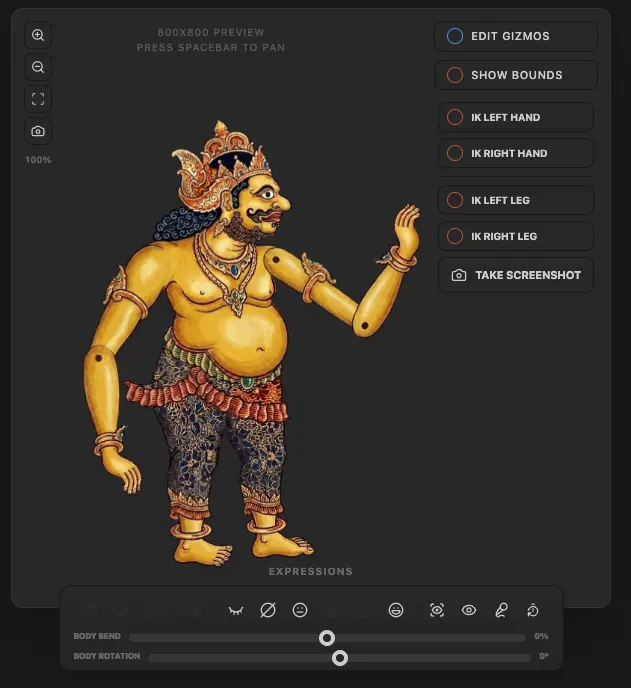
The Character Builder is a powerful, built-in tool designed specifically for Directors and Story Curators. It streamlines the process of transforming static artwork into fully rigged, animatable puppets ready for the demands of live theatre.
Key Features
Specialized Rigging Templates
Whether your story features a classic protagonist or a mythical beast, we have the framework ready: Humanoid Builder for bipedal structures and Animal Builder for quadrupeds.
Instant IK (Inverse Kinematics)
Forget complex bone mapping. The moment you add a limb, an IK Solver is automatically applied. Simply grab a hand or a hoof, and the rest follows realistically.
Dynamic Expression Engine
Bring emotion to the stage. Build a library of facial expressions and swap between Normal, Happy, Angry, and Laugh states on the fly during a performance. Eye tracking and auto-blinking included.
Instant Snapshots
The system generates high-resolution screenshots for your production notes and cast list automatically upon publishing.
The Workflow: From Sketch to Scene
Step 1: Design & Style
Start with your vision. Use our provided guidelines to ensure your character is structured for animation. Feel free to use AI generation tools to quickly explore color palettes or specific artistic styles.
Step 2: Part Extraction
Your character needs to be broken down into individual components (head, neck, torso, limbs, etc.). Use our integrated AI tools to automatically identify and 'cut out' body parts, or refine them in Photoshop.
Step 3: Assembly (Import)
Open the Character Builder and begin importing your parts. Always start with the Torso (the root), then work outward to the neck/head, limbs, and finally the hands and feet.
Step 4: Expression Tuning
Select the face/head layer to define your expressions. Import different versions of the face for each mood: Normal, Happy, Unhappy, and Laugh/Angry.
Step 5: Test the Rig
Before going live, use the preview window to test the IK Solvers. Move the limbs around to ensure the joints bend naturally and the parts are joined correctly.
Publishing & Deployment
Stage Ready
The character is added to your library, fully optimized for live performance. Actors can be assigned control for real-time performance instantly.
Character Snapshot
The system generates high-resolution production notes and cast list assets automatically, ensuring your documentation stays up to date.
Ready to build your cast? Start today.